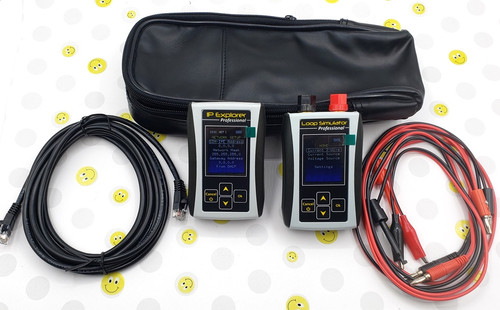
Don't know the PLC IP address? This handheld
will read it from the attached device in an
instance.
With the IP Explorer Professional you no
longer have to struggle with Firewalls,
Blocked ports, Anti-viruses and VPN
software. Assign IP address in seconds, no
computer required!
Don't want your maintenance crew to wake you
up in the middle of the night to replace
broken Ethernet module?
This device will save you the trip and
reduce the plant downtime!
Overview:
Designed for BOOTP/DHCP enabled Ethernet/IP
devices.
Portable and battery powered, always ready
in a second.
Simple four button control
Can detect IP address of most industrial
control devices
It replaces your computer based BOOTP/DHCP
Server and will quickly assign any IP
address to any industrial BOOTP or DHCP
enabled control device, like Programmable
Controller, PLC communication modules, smart
switches and I/O adapters.
Tested with a wide range of controllers but
generally supports any BOOTP/DHCP enabled
device (see below lineup of controller
models and series)
Functionality
Unknown IP detection:
IP Explorer Professional can detect an
unknown IP address of an Ethernet device.
Simply connect a cable and wait for
detection. (This function possibly requires
a power cycle of target device)
IP address selection:
IP address can be selected from the list of
previously used addresses or specified by
user.
IP Explorer Professional remembers last 10
addresses used.
BOOTP Requests:
IP Explorer Professional will service a
standard BOOTP or DHCP request.
The target device MAC address will appear on
the screen.
Disable BOOTP (Set IP Static):
For Ethernet/IP enabled devices the IP
Explorer Professional can set IP address as
static.
Target device must comply with Ethernet/IP
CIP specification to accept this command.
Battery and Cables:
IP Explorer Professional connects directly
to the target device through a direct or
crosslink cable.
IP Explorer Professional uses two AA size
batteries (not included). Rechargeable Ni-MH
batteries recommended.
IP Explorer is here -
handheld device that can detect IP addresses
of industrial control devices.
Unknown IP discovery was the feature mostly
wanted by integrators and maintenance
technicians so we
decided to make device that can do only this
and as a result we can provide it at much
lower price.
New compact plastic case with rubber sides
takes less room than multi-meter so IP
Explorer can
permanently stay in your toolbox and work in
any industrial environment.
Simply turn handheld on and attach Ethernet
cable.
IP and MAC address will appear on LCD
display.
Please note that not every IP address can be
detected.
And as all our products it comes with free
24/7 email support to all our customers.
$124.95
(FREE shipping, USA only)
Servo Axis
Simulator
Servo Axis
Simulator developed to assist integrators
and OEM in application development for
projects with servo drives with analog
command signal and incremental encoder
feedback.
It allows debugging of motion applications
in the lab environment, virtually on the
table, with PLC or CNC only without actual
running motors and drives.
Servo simulator was originally developed to
debug a motion controller project when
drives were not available during
development.
With Servo Simulator motion controller
program was developed and tested before
actual machine and drives were available.
That reduced installation time from weeks to
hours.
Servo simulator uses advanced
microcontroller that allows high-speed move
simulation and fast response.
It simulates servo axis with servomotor and
encoder.
Simulator can generate maximum 16250 pulses
per second (65000 in “A Quad B” or x4 mode)
that is equivalent to about 3800rpm motor.
Default encoder settings are 256 pulses per
revolution.
It effectively provides 1024 positions per
revolution if CNC or motion controller uses
x4 mode.
This device is intended to provide general
assistance with application development and
debugging and can’t be used in live
production systems.
(Free shipping, USA only, for
international orders please contact us)
USB Servo
Simulator
(new)
Servo Axis Simulator USB - the next
generation of Servo Simulators was developed
to assist integrators in application
development for projects with analog servo
drives and incremental encoder feedback.
It allows motion application debugging in
the lab environment, virtually on the table,
with PLC or CNC only and without actual
running motors and drives.
$64.95
(Free shipping, USA only, for
international orders please contact us)
Servo Axis
Simulator
USB - the
next
generation
of Servo
Simulators
was
developed to
assist
integrators
in
application
development
for projects
with analog
servo drives
and
incremental
encoder
feedback.
It allows
motion
application
debugging in
the lab
environment,
virtually on
the table,
with PLC or
CNC only and
without
actual
running
motors and
drives.
High
Speed USB
interface
helps in
parameter
customization
and live
monitoring
for multiple
axis
Servo
simulator
uses an
advanced
microcontroller
that allows
high-speed
move
simulation
and fast
response.
Simulator
uses USB
power from a
computer -
no external
power supply
required
Simulator
can generate
maximum
98,000
pulses per
second
(24.5KHz per
each
channel).
Default
encoder
settings are
1024 pulses
per
revolution
that can be
changed via
USB
interface.
Windows
Software is
available
for download
as MSI
installer
package or
Executable
file:
This link
---->
Installer
Package is
the will create
all folders,
files and
shortcuts.
Unzip and
run MSI
file.
This
link ---->
Executable
File is
the and can
be used
without
installation
from any
folder
This device is intended to provide general assistance with application development and debugging and can’t be used in live production systems.
Linksys model BEFSR41
Etherfast 4-Port Cable/DSL Router version 4
(wired
(not
wireless))
Linksys model BEFSR41 Etherfast
4-Port Cable/DSL Router, great
router at a great price...
These are brand new (not
refurbished) factory sealed and
include the router, power
supply, Ethernet cable and
everything else in the box..
Version 4
These are 'plug and play'
1) Turn off your computer
2) Connect your Internet to the
first port
3) Plug in the router (connect
power)
4) Connect the provided cable
from your PC to the router
5) Turn on your PC... once
everything is running (speed is
depending on your PC) you are
done.
This does
come with an install CD, but you
do not need it.... the fewest
things (software) running on
your PC the better and faster it
will run.
Do not use the setup CD to
configure the router...You can
configure the router manually
if needed, (most people do
not need to). Connect the modem
to the router on the Internet
Port and Computer to the router
on Ethernet Port on your PC...
Now open the router setup page
by typing 192.168.1.1 in the
address bar of your web browser
.The default password is
"admin"... Now you can configure
your router.
Product Information
The Linksys Instant Broadband EtherFast Cable/DSL Router is the perfect option to connect a small group of PCs to a high-speed Broadband Internet connection or to an Ethernet back-bone. Configurable as a DHCP server, the EtherFast Cable/DSL Router acts as the only externally recognized Internet device on your local area network (LAN). The router can also be configured to block internal users' access to the Internet. Unlike a typical router which can only share 100Mbps over all its connections, the Linksys EtherFast Cable/DSL Router is equipped with a blazing 4-port EtherFast Switch, dedicating a breakneck 100Mbps to each and every connected PC.